

by Carly Caines on January 06, 2021
Last Updated: August 21, 2026. This article has been reviewed and updated by the ProjectLine Solutions team to ensure the information reflects our current experience helping small and mid-size businesses evaluate and implement ERP.
If you’re spending too much time moving information between systems, fixing data errors or piecing together spreadsheets just to understand what’s happening in your business, you may be starting to wonder if there’s a better way.
That’s often what leads businesses to enterprise resource planning (ERP) software.
At ProjectLine Solutions, we’ve spent more than 20 years helping small and mid-size businesses move away from disconnected systems and manual processes with ERP.
By the end of this article, you’ll fully understand what ERP is, how it works, what it can do and how to tell if your business is ready for it.
What is ERP?
Enterprise resource planning (ERP) is a type of software that connects your core business functions, such as accounting, sales, inventory, purchasing and operations, in one system. Instead of information being stored and updated separately by each department, ERP allows your teams to work from shared data and connected processes.
For example, when a customer places an order, your ERP system can update inventory, send the order to your warehouse and record the financial impact without your team entering the same information in multiple places.
ERP has continued to evolve with cloud technology, automation and, more recently, artificial intelligence (AI). What was once primarily used by large enterprises is now accessible to small and mid-size businesses that need a more connected way to manage their operations.
The result is a more connected view of your business. Your teams work from the same information, you spend less time moving data between systems and you have better visibility into what’s happening across your operations.
How does an ERP system work?
An ERP system connects your business data and processes, so information flows automatically between departments rather than being re-entered or transferred manually.
Think about what happens after you receive a customer order. Sales needs to know whether the product is available. Your warehouse needs to know what to pick and ship. Inventory needs to reflect what's been sold. And accounting needs the information to invoice the customer and record the transaction.
With disconnected systems, each of those steps may require separate data entry, spreadsheets or communication between teams. With ERP, they're part of one connected process.
That connection is what makes ERP so valuable. A change in one area of your business can automatically flow through to the others, giving your team access to more accurate, up-to-date information while reducing manual work.
When do you need ERP?
In the ERP projects we work on, we see that businesses rarely reach a single moment when they suddenly realize they need ERP. More often, smaller inefficiencies gradually become bigger problems as the business grows.
These challenges often become more noticeable as your transaction volume, inventory, customer base and team expand.
Growing companies typically turn to ERP to address one or more of these four challenges. The details vary from business to business, but the underlying issues are often the same.
1. Disconnected systems create duplicate work
When your systems don't talk to each other, your team has to fill the gaps. That often means entering the same information more than once, exporting and importing data or using spreadsheets to reconcile information between systems.
Besides taking up valuable time, all that manual work creates more opportunities for errors. You can end up with multiple versions of the same information and no clear answer about which one is right.
2. Manual processes slow down your business
Manual work may be manageable when your business is smaller. But as transaction volumes increase, tasks like processing orders, updating inventory, creating invoices and preparing reports take more and more time.
ERP can automate many of those routine steps and connect processes across departments. That frees your team to spend less time on administrative work and helps information move through your business faster.
3. Limited visibility makes decisions harder
When your data is spread across different systems and spreadsheets, getting answers to basic business questions can take far too long.
How much inventory do you have? What's selling? Which products are profitable? Where are orders getting held up?
ERP gives you a more complete view of your operations because the underlying information is connected. Instead of spending hours pulling data together before you can analyze it, you can get to the information you need faster and make decisions with more confidence.
4. Your current systems can't keep up with growth
The tools that worked when your business was smaller may become a constraint as you grow. More customers, orders, inventory and employees put additional pressure on processes that already rely heavily on manual work.
ERP gives you a foundation that can support greater complexity without requiring your team to keep adding spreadsheets, workarounds and disconnected applications every time the business changes.
What does ERP software do?
ERP functionality is typically organized into modules, with each module managing a specific area of your business. The exact features vary by ERP system, but common areas include:
- Finance & Accounting: Improve financial management by automating your processes and gain accurate, real-time insights to help you stay on top of tasks and compliance.
- Procurement & Supply Chain: Gain a resilient supply chain by improving purchasing decisions and strengthen supplier relationships .
- Manufacturing: Stay ahead of production by tracking work orders, managing schedules and ensuring your resources are used to their fullest potential.
- Inventory Management: Gain real-time visibility of inventory levels and automate restocking to avoid over or under-stocking.
- Warehouse Management: Optimize your warehouse operations with precise tracking, faster order fulfillment and more efficient inventory handling.
- Analytics: Make smarter, data-backed decisions with easy-to-understand reports and powerful insights into your business’s performance.
- CRM (Sales & Marketing): Automate workflows, track leads and run integrated marketing campaigns that keep customers engaged.
- Project Management: Plan, execute and track all of your projects from start to finish, ensuring on-time delivery and adherence to budgets.
- Service: Provide top-notch customer support by streamlining service requests, scheduling and tracking performance to ensure a high level of satisfaction.
- Ecommerce: Connect your ERP and ecommerce store to improve product management, order processing and customer experience.
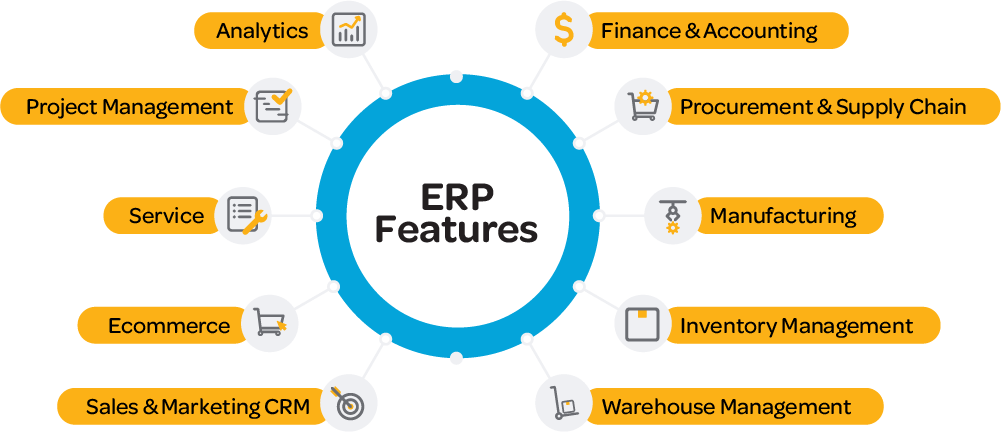
You won't necessarily need all of this functionality from the get-go. A good ERP system should provide the features you need today, with the ability to add or expand functionality as your business changes.
What are the benefits of ERP?
The biggest benefit of ERP is having your people, processes and data working together in one system. That can improve efficiency and give you better information to run your business.
The specific benefits will depend on your business and how you use ERP, but common improvements include:
- Better visibility across your business: Connected data gives you a clearer picture of what's happening across finance, sales, inventory and operations, without pulling information from multiple systems and spreadsheets.
- Less manual work: ERP can automate repetitive tasks and move information between different areas of your business, reducing time spent on data entry, reconciliation and routine administrative work.
- More accurate, consistent data: Reducing duplicate data entry and conflicting information gives your team more confidence in the data they're using day to day.
- Faster, more informed decisions: Better access to accurate information means you can spend less time gathering and validating data and more time using it to make decisions.
- More consistent processes: Standardizing how work gets done can make it easier to train employees, reduce workarounds and keep operations consistent as your team grows.
- A stronger foundation for growth: ERP can help you manage greater transaction volumes, more inventory, additional locations and increasingly complex processes without adding more spreadsheets and disconnected systems.
As your business grows and becomes more complex, ERP helps you manage that complexity without adding the same level of manual work.
What ProjectLine customers have achieved with ERP
ERP results vary based on your business, processes and implementation, but ProjectLine customers have achieved measurable improvements, including:
- $60k+ labour savings reinvested into high-value tasks
- 20% decrease in inventory carry costs
- 96% decrease in time required for period-end close
- 50% faster processing quotes into invoices, packing slips and other documentation
What are the different types of ERP deployment?
ERP systems can be deployed in the cloud, on-premise or using a combination of both. The right option depends on factors like your IT resources, security requirements, budget and how much control you want over your infrastructure.
- Cloud ERP: Your ERP software and data are hosted outside your business and accessed over the internet. With public cloud ERP, you typically share the underlying infrastructure with other customers, while private cloud gives you a dedicated environment. Cloud ERP can reduce the IT resources and infrastructure you need to manage yourself.
- On-premise ERP: With on-premise ERP, your system is installed on servers that your business owns and manages. This gives you greater control over your infrastructure, but also means you're responsible for maintaining the hardware, security, backups and system environment.
- Hybrid ERP: A hybrid approach combines cloud and on-premise technology. This can be useful when you want to move some parts of your business to the cloud while keeping certain systems, data or processes on-premise.
There's no single deployment model that's right for every business. For many small and mid-size businesses, the decision comes down to balancing control and flexibility with the cost and resources required to manage the underlying technology.
What are some examples of ERP software?
Now you might be wondering: what types of ERP systems are there and how do I decide which one is best for my business?
Choosing the right ERP is a big decision, and we understand how overwhelming the process can be. The best ERP for your business ultimately depends on your industry, budget and growth plans. Here’s a look at the best ERP systems for small businesses and what they do best:
1. NetSuite: Best all-in-one ERP for scalability
NetSuite is a cloud ERP designed for high-growth companies that need flexibility as they expand. With its modular approach, your business can start with a SuiteSuccess implementation for a fast, industry-specific rollout and scale over time by adding native NetSuite modules for advanced financials, inventory, ecommerce and more. Plus, its robust automation, real-time reporting and extensive customization options ensure your ERP evolves alongside your business.
2. SAP Business One: A strong choice for on-premise or private cloud deployment
SAP Business One is a powerful ERP tailored for small to mid-sized manufacturers and wholesale distributors, offering robust inventory and supply chain management alongside comprehensive financial tools. What sets it apart is its flexible deployment options—on-premise or private cloud—giving your business greater control over data, security and system customization. If you prefer to keep your ERP in-house or want a dedicated cloud environment, SAP Business One provides the flexibility to align with your IT strategy.
3. Acumatica: Great for service-based and project-oriented businesses
Acumatica is a good option for service-based businesses, construction companies and project-driven industries that require advanced financials and project management tools. Acumatica’s open API structure also makes it easy to integrate with third-party applications.
4. Microsoft Dynamics 365 Business Central: Ideal for businesses already using Microsoft products
Microsoft Business Central is a strong ERP for small businesses that rely on Microsoft tools like Office 365, Power BI and Teams. It offers seamless integration with these products, making it easy to adopt. With strong financials, sales and inventory management, it’s a good fit for businesses looking for a familiar interface and easy connectivity.
5. Odoo: Helpful for budget-conscious businesses with simple processes
Odoo is an open-source ERP with a modular structure, allowing businesses to start with basic functions and expand as needed. It’s highly customizable and affordable compared to other ERPs, making it a good option for startups and small businesses that have relatively simple processes and the resources to support a higher level of customization.
6. Epicor: Suitable for niche industries and manufacturing
Epicor is a strong contender for small manufacturers, specialty retailers and automotive businesses. It provides deep industry-specific functionality, particularly for businesses with complex production workflows. If you need an ERP tailored to your niche industry, Epicor might be the right fit.
How do you know if your business needs ERP?
Now that you understand what ERP can do, the bigger question is whether it makes sense for your business.
If your current systems are working well, your team can easily access the information they need and manual processes aren't holding you back, ERP may not be a priority right now. On the other hand, if disconnected systems, unreliable data or time-consuming manual work are becoming harder to manage, it's worth exploring whether ERP could help.
If you're starting to think seriously about ERP, cost is likely one of your next questions. Our guide to ERP pricing and implementation costs explains what you should expect to budget and the factors that can affect your total investment.
From there, a good next step is to understand where your business stands today.
Frequently asked questions about ERP
Is ERP the same as accounting software?
No. Accounting software focuses primarily on financial processes like bookkeeping, accounts payable, accounts receivable and financial reporting. ERP includes accounting functionality but connects it with other areas of your business, such as inventory, purchasing, manufacturing, sales and operations.
What's the difference between ERP and CRM?
Customer relationship management (CRM) software focuses on managing customer relationships, leads and sales activity. ERP manages a broader range of business operations, including finance, inventory, purchasing, manufacturing and fulfillment.
The two can work together, and many ERP systems include CRM functionality or integrate with dedicated CRM software.
Learn more about the differences between ERP and CRM software.
What's the difference between ERP and MRP?
Material requirements planning (MRP) focuses on helping manufacturers plan what materials they need, how much they need and when they need them for production.
ERP covers a much broader range of business functions. It can include MRP functionality while also managing areas like finance, inventory, purchasing, sales and customer relationships.
Learn more about material requirements planning (MRP).
How much does ERP cost?
ERP costs vary based on the software you choose, the number of users, the functionality you need and the complexity of your implementation. You'll also need to consider costs beyond the software itself, including implementation, training, customization, integration and ongoing support.
For a more detailed breakdown, see our ERP cost guide.
How long does an ERP implementation take?
There's no standard ERP implementation timeline, but at ProjectLine, we typically implement ERP for small to mid-size businesses in about 6 to 9 months.
The size of your business, complexity of your processes, amount of data you need to migrate, integrations, customizations and your team's availability can all affect how long the project takes.
A relatively simple implementation may take a few months, while a more complex ERP project can take longer. The important thing is to build a realistic implementation plan around your requirements rather than choosing a timeline first and trying to make the project fit it.
Can ERP integrate with your existing software?
Yes. ERP systems can integrate with other software so data can move between systems without relying on manual entry. This is useful when you have specialized applications that still serve your business well and don't need to be replaced by ERP functionality.
The type and complexity of the integration will depend on your ERP system, the software you're connecting and what information needs to move between them.