Last updated September 17, 2026. We updated this article with new insights, practical examples and a video covering five common ERP mistakes and how to avoid them.
You invested in an Enterprise Resource Planning (ERP) system expecting better data, more efficient processes and greater visibility across your business. But the results haven't quite lived up to those expectations.
Maybe you can't trust the data. Your team is still relying on spreadsheets and manual workarounds. Or the system simply feels harder to use than you thought it would.
When that happens, it's easy to assume you chose the wrong ERP software. But the software itself often isn't the root of the problem.
At ProjectLine Solutions, we've helped 200+ small and mid-size businesses implement ERP systems and work through challenges with existing ones. Many of the ERP problems we see come back to decisions made around the system: how requirements were defined, how the ERP was configured, the partner you worked with, the quality of your data and how well your team was prepared for the change.
The good news is that these problems are avoidable.
By the end of this article, you'll know the biggest ERP problems businesses face, why they happen and how you can avoid them to get more value from your ERP investment.
If you'd rather watch than read, Armaan Thaman from ProjectLine breaks down the five common ERP mistakes we see and the practical steps you can take to avoid them.
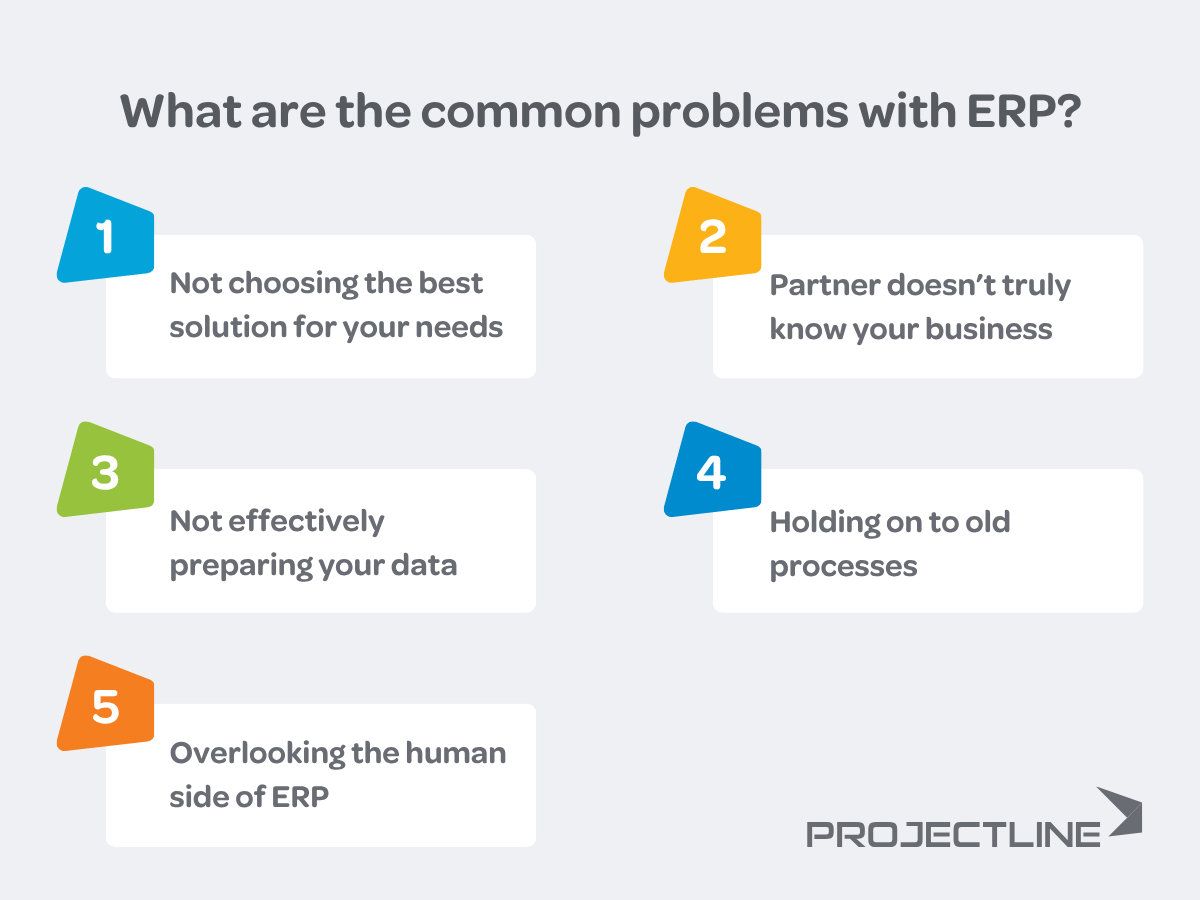
The five problems we'll cover are:
Each one can create very different symptoms, from unreliable reporting to frustrated employees. But they share something important: they're easier to prevent when you address them early.
Many ERP challenges can be traced back to how the system was selected and implemented.
Sometimes, the ERP software simply isn't a good fit for your requirements. But more often, the software is capable of doing what you need, but the implementation doesn't account for how your business operates.
For example, let's say you're a manufacturer and your customers still submit paper order forms. If your ERP is configured using a generic, out-of-the-box template, your team might end up manually entering every order into the system.
A partner that takes the time to understand your process might identify a better option, such as using Optical Character Recognition (OCR) technology to capture the information from those forms and feed it into your ERP.
Same ERP software. Very different outcome.
This is why understanding your requirements before you select an ERP system and configure it is so important.
Start by documenting your detailed business requirements, going beyond a simple checklist of software features. A structured ERP requirements gathering process can help you separate the functionality you truly need from the features that are simply nice to have.
Be sure to consider:
This gives you a much stronger picture of what your ERP system needs to support. It also helps you evaluate whether a potential solution can support your business without forcing unnecessary workarounds.
When reviewing ERP options, look for a balance between standard functionality and flexibility. Standard features can make implementation simpler and easier to maintain, but they may not support every important process.
Customization can also add significant value when it addresses a genuine business requirement. But you want to be selective. Before adding custom functionality, consider the benefits and potential drawbacks of ERP customization and whether configuration, an integration or a process change could solve the problem more simply.
The goal is to choose and configure an ERP system that supports the way your business operates while improving the processes that need to change.
The ERP partner you choose can have just as much impact on your results as the software itself.
A partner may know the ERP software inside and out. But if they don't understand your processes, they may configure a system that works technically but doesn't work well in practice for your team.
Imagine you're struggling with inventory accuracy. Your ERP partner could simply configure the inventory functionality you've purchased and show your team how to use it.
Or they could dig deeper.
Why is your inventory inaccurate today? Where are errors being introduced? Are employees manually entering the same information in multiple places? Is inventory being received, transferred or consumed inconsistently? Are there opportunities to use scanners or automation to remove manual steps?
Those conversations can lead to a very different ERP solution.
Discovery is one of the best indicators.
Before recommending a solution, your ERP partner should spend time learning how your business operates, where your biggest challenges are and what you're trying to improve. A thorough ERP discovery process gives your partner the context they need to design the right solution rather than simply configure a list of requested features.
Ask potential partners:
Pay attention to the questions they ask you, too.
If most of the conversation is about software features and very little is about your business, that's worth noting. A strong ERP partner does their due diligence before configuring the system because they need to understand what they're trying to improve.
Your ERP partner's job goes beyond getting the software running. They should help you build an ERP system that improves the way your business operates.
Your ERP system is only as reliable as the data you put into it.
Duplicate customer records, inconsistent product information, missing fields and outdated data don't disappear when you implement ERP. If you migrate them as-is, you're simply moving those problems into your new system.
And bad data can quickly become a people problem too.
Imagine a salesperson checks your ERP system to confirm whether a product is available. The system says you have 25 units in stock, but they discover the number is wrong. It happens again the following week.
Before long, they're calling the warehouse to confirm inventory instead of trusting the ERP system.
That's exactly the type of manual workaround ERP is supposed to eliminate.
Start your data cleanup early. Preparing and cleansing your data can take more time than you expect, especially if you've accumulated years of information across spreadsheets and disconnected systems.
First, decide who owns each data set. Your accounting team might be responsible for financial records, while operations owns inventory and product data. Clear ownership creates accountability and helps prevent data cleanup from becoming a last-minute scramble.
Then, take the following steps:
Following ERP data migration best practices can help you plan this work early enough that data doesn't become a bottleneck later in the project.
Your ERP partner should also play an active role. They can help establish data requirements, guide your team through cleansing and consolidation and identify issues before migration begins.
And if the data isn't ready, they should be willing to tell you.
Delaying a go-live date isn't ideal. But moving forward with unreliable data just to stay on schedule can create much bigger problems after launch.
When your data is clean, consistent and trusted, your ERP becomes far more useful for reporting, automation and day-to-day decision making.
Implementing a new ERP system gives you a rare opportunity to take a fresh look at how work gets done across your business.
But it's easy to fall into the trap of rebuilding every existing process inside the new system.
Your team knows those processes. They're comfortable with them. And when you're already changing your technology, keeping familiar workflows can feel like the easier option.
The problem is that many of those workflows were created to work around the limitations of your old systems.
Maybe someone exports a report to Excel every morning, manually updates it and emails it to the team. Maybe purchase approvals bounce between inboxes because your old accounting software couldn't manage the workflow. Or your employees enter the same information into multiple systems because those systems don't communicate with each other.
Recreating those processes in ERP means carrying the same inefficiencies forward.
Instead of asking your ERP partner to recreate exactly what you do today, use the implementation as an opportunity for business process improvement.
For each important workflow, ask:
Your employees should be part of these conversations too. They're closest to the day-to-day work and often know exactly where processes are inefficient.
Getting them involved early can also improve ERP user adoption. Instead of having a completely new process handed to them at go-live, your employees have an opportunity to explain what's working, what's frustrating and where they see room for improvement.
You also want to stay open to capabilities that weren't available when your old processes were designed. Automation, integrations and newer technologies can remove manual work that may have been unavoidable five or 10 years ago.
That doesn't mean every old process needs to change. If a workflow gives your business an advantage or supports an important requirement, there may be a good reason to preserve it.
The key is to make that decision intentionally, rather than rebuilding an old process simply because that's how you've always done it.
You can choose the right software, configure it well and migrate clean data. But if your employees don't use the system properly, you still won't get the results you expected.
ERP implementation requires significant involvement from your team. They'll help define requirements, validate processes, clean data, test the system and learn new ways of working, all while keeping up with their regular responsibilities.
Underestimating that commitment can lead to overwhelmed employees, resistance to change and poor ERP user adoption.
And when adoption suffers, old habits have a way of coming back. Employees keep their own spreadsheets, follow old processes or find workarounds because those options feel more familiar.
This is why the human side of ERP deserves just as much attention as the technology.
There are three areas you should focus on: ownership, training and communication.
Assign an internal ERP champion who can help keep the project moving and act as a bridge between your employees and your ERP partner.
Your ERP champion shouldn't be expected to do everything themselves. You need involvement from people across the business, particularly when you're gathering ERP requirements, testing processes and making decisions that affect individual departments.
But someone needs to keep the bigger picture in view.
Your ERP champion can help coordinate internal resources, keep decisions moving and make sure employees understand what's expected of them throughout the project.
Most importantly, give that person enough time to do the job. Adding ERP implementation on top of someone's full-time responsibilities without adjusting their workload is a quick way to create burnout.
ERP training shouldn't be a single session where every employee sits through the same demonstration.
Your accounting team doesn't need to learn the system the same way your warehouse or sales teams do. People need hands-on training that reflects the tasks they'll perform in the system day to day.
Effective ERP training should give employees an opportunity to work through realistic scenarios, ask questions and build confidence before they're expected to use the system on their own.
Training shouldn't end at go-live either. People forget things. New questions emerge once they're working in the system every day and new employees will need to be trained as your team changes.
Planning for ongoing training and support helps prevent employees from falling back into old habits when they run into a problem.
Don't just tell your employees that a process is changing. Help them understand why.
If someone has completed the same task the same way for 10 years, they're naturally going to wonder why they need to learn something new.
Show them what the change means for their day-to-day work.
Maybe they'll no longer need to enter the same information twice. Maybe a report that took two hours to build in Excel will be available in real time. Or maybe they'll finally be able to answer a customer's inventory question without calling someone in the warehouse.
This is an important part of ERP change management. When your team understands the problem you're trying to solve and how the new process can make their jobs easier, they're more likely to embrace the change.
ERP success depends on your people. Give them ownership, the right training and a clear reason to embrace the new way of working, and you'll have a much stronger chance of seeing the results you expected from your investment.
Most ERP problems are easier to prevent than they are to fix after go-live. Here's a quick summary of the five issues we've covered and what you can do to reduce the risk.
| Common ERP problem | What can happen | How to avoid it |
| Choosing or configuring the wrong ERP solution | Manual workarounds, inefficient processes and frustrated users | Define your requirements before selecting and configuring ERP |
| Working with the wrong ERP partner | Your system doesn't reflect how your business operates | Choose a partner that invests time in discovery and understands your processes |
| Not preparing your data | Employees can't trust reports or information in the system | Clean, standardize and validate your data before migration |
| Holding on to old processes | Existing inefficiencies get recreated in your new system | Review processes and look for opportunities to simplify or automate them |
| Poor user adoption and change management | Resistance, poor adoption and a return to old ways of working | Assign internal ownership, provide role-based training and communicate why things are changing |
When your ERP isn't delivering what you expected, it's easy to question whether you chose the wrong software. But as we've covered, many of the most common ERP problems come back to the decisions made around the system.
Clear requirements, clean data, better processes, the right ERP partner and a team that's prepared for change can make a significant difference in the results you get.
And the work doesn't stop at go-live. Once your system is up and running, focus shifts to adoption, optimization and making sure you're continuing to get value from your investment. Our guide to five essential ERP post-implementation activities is a good next read if you're approaching or have recently completed go-live.
If you're already experiencing some of the problems we've covered, you don't necessarily need to start over. The first step is understanding what's causing the issue and what needs to change.
At ProjectLine, we've helped 200+ small and mid-size businesses implement ERP and work through challenges with existing systems. If you want a second opinion on your ERP project, request a free consultation. We're happy to talk through what's happening and help you determine the best path forward.
ERP implementations can struggle when the project isn't properly planned, resourced or supported. Poor requirements gathering, unrealistic expectations, bad data, inadequate training and a lack of internal ownership can all contribute.
That's why a successful ERP implementation requires attention to your processes and people as well as the technology.
Start by clearly defining what you need your ERP system to accomplish. Then choose software that fits those requirements, work with a partner that understands your business, prepare your data and involve employees throughout the project.
It's also important to treat go-live as a milestone rather than the end of the project. Your post-implementation activities should include ongoing training, support and system optimization.
In many cases, yes. The right solution depends on what's causing the problem.
Configuration issues may require changes to the system. Poor adoption may call for additional training and change management. Data problems could require cleanup or changes to the processes that create and maintain that data.
Start by identifying the root cause before deciding how to fix it. Sometimes your existing partner can help get the project back on track. In other cases, bringing in a new ERP partner can provide a fresh perspective on what's going wrong and what needs to change.
If you're using NetSuite, for example, NetSuite project recovery can help identify issues with an existing implementation and create a path forward.
Training plays a major role in ERP adoption. Your employees need to understand not only how to complete their tasks in the system, but also how their work fits into the processes around them.
Role-based, hands-on training helps people build confidence before go-live. Ongoing training is equally important as employees encounter new situations, your processes evolve and new people join your business.
Start by defining the specific problems you're experiencing rather than assuming the ERP software itself is the issue.
Are employees creating workarounds? Is your data unreliable? Are certain processes taking longer than expected? Are people struggling to use the system? Or is the ERP missing functionality your business needs?
Once you've identified the symptoms, work backwards to find the root cause. That will help you determine whether you need a configuration change, cleaner data, process improvements, additional training or broader changes to your ERP implementation.